



Most roofers I talk to have either burned money on Google Ads or avoided them entirely because they've heard horror stories. Both reactions make sense. Poorly managed campaigns can drain thousands with nothing to show `for it.
But when set up correctly, Google Ads for roofing consistently deliver high-intent leads from homeowners actively searching for roofing services in your area. This guide covers how the system works, what it costs, and the tactics that differentiate profitable campaigns from costly mistakes.
What Are Google Ads for Roofing Companies
Google Ads help roofers capture high-intent leads. These are homeowners actively searching for services such as “roof repair near me,” often with an immediate need.
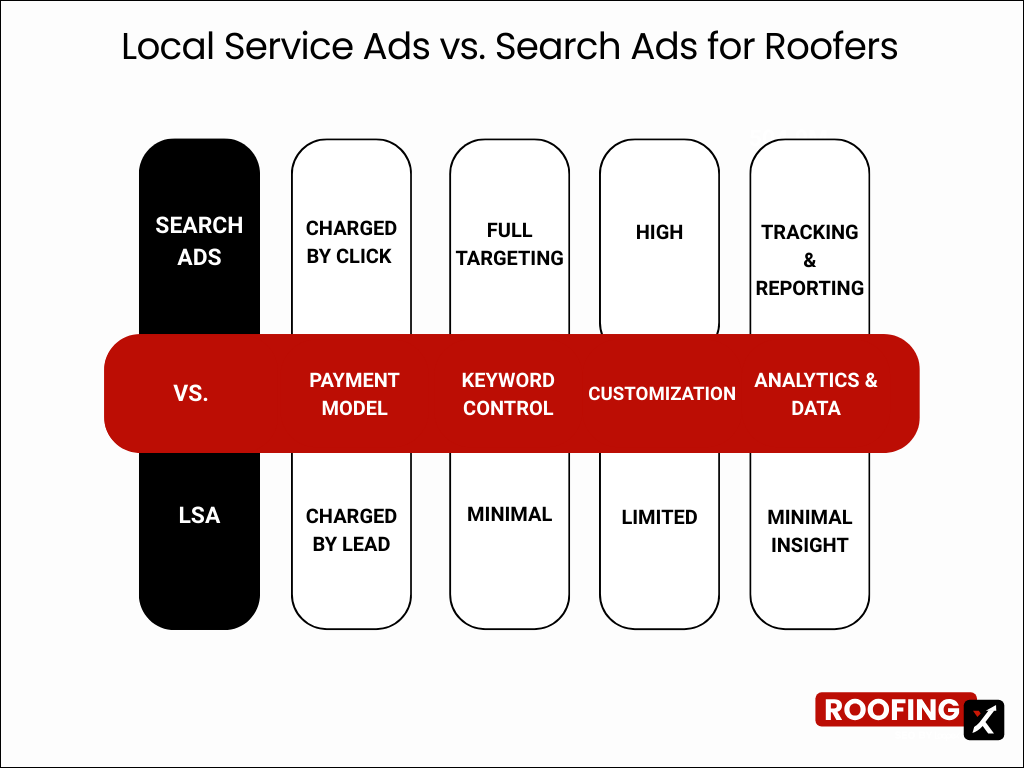
You can run standard Search campaigns, where you pay per click. Or you can use Google Local Services Ads, where you pay per lead. Both place your roofing company at the top of Google when someone nearby searches for repairs, replacements, or storm damage.
The system works like an auction. You bid on keywords, and Google decides when your ad appears. You only pay when a homeowner takes action:
- Pay-Per-Click (PPC): You pay when someone clicks your ad
- Pay-Per-Lead (LSAs): You pay when a homeowner contacts you directly
- Intent-Based: Your ad shows up only when people are actively searching for roofing services

How Google Ads Work for Roofing Contractors
When someone searches "roof replacement dallas," Google runs an instant auction among advertisers bidding on that keyword. Your position in the results depends on two things: your bid amount and your quality score.
The quality score measures how relevant your ad and landing page are to the search query. Now this is a crucial point to remember: A roofer with a lower bid but a higher quality score can outrank a competitor paying more per click. Google rewards relevance because it wants searchers to find what they're looking for.
Your ads appear above organic search results. Local Services Ads show up even higher, right at the top with a Google Guaranteed badge next to your business name.
Types of Google Ads for Roofers
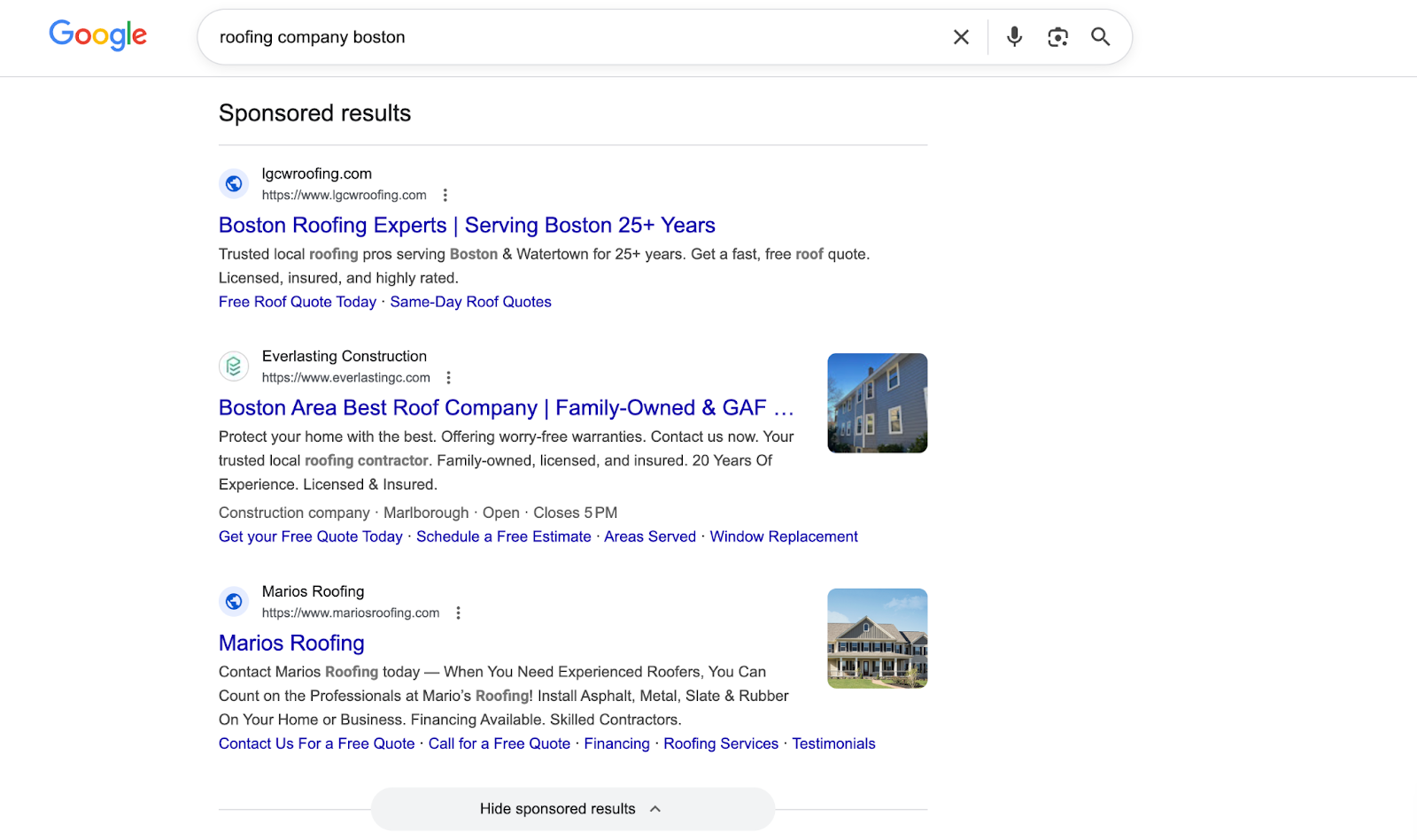
Search Ads
Search ads are keyword-triggered text ads that appear at the top of Google results. When a homeowner searches for terms like “emergency roof leak repair,” your ad can show immediately. This works well for roofing because it captures people actively seeking help, often with urgent issues. You pay per click, meaning you’re charged only when someone clicks your ad.
Local Services Ads (LSA)
Local Services Ads work differently from standard search ads. Instead of paying per click, you pay per lead, and Google pre-screens inquiries before sending them to you. Your listing also displays the Google Guaranteed badge, which helps build trust with homeowners. Because of this screening and trust factor, many roofers see higher-quality leads from LSAs than from traditional search campaigns.
Display and Video Ads
This is the third type: display ads. They appear as banners across websites, while video ads run before YouTube content. Both are better suited for brand awareness than immediate lead generation. Most roofers prioritize Search ads and LSAs first, then add display and video later for retargeting past website visitors. Some roofers also pair Google Ads with Facebook Ads for roofing to capture homeowners earlier in the buying cycle.
Automated Campaigns (Google runs these for you)
These are newer campaign types where Google does more of the work for you. They can be powerful, but timing matters to Google Ads for roofing effectiveness.
Performance Max
Performance Max is an automated campaign type that shows your ads across Search, Maps, YouTube, Display, and Gmail using Google’s automation. It works best once you already have conversion data, because Google needs real results to learn who becomes a roofing lead.
Demand Gen
Demand Gen campaigns focus on visual placements across YouTube, Discover, and Gmail to generate demand before users search. They’re usually better for building awareness or retargeting, not for capturing urgent roof repair searches.
Benefits of Roofing Pay-Per-Click Advertising
Instant Visibility on Google Search Results
SEO takes months to build momentum, though organic visibility can start to increase within weeks with the right approach. My team has proven it by doing it for 120+ roofing companies. Check out our case studies to see for yourself.
Google Ads can potentially show your business at the top of search results the same day you launch. During storm season or when expanding to a new service area, this speed matters.
Precise Geographic Targeting for Service reas
You can set a radius around your office or target specific zip codes. A roofer in Houston can show ads only to homeowners within a 25-mile radius. No wasted spend on clicks from people outside your service area.
Trackable ROI on Every Dollar Spent
With conversion tracking set up, you can trace every lead back to specific keywords and ads. You'll know exactly which searches generate phone calls and which ones waste money. This level of tracking isn't possible with billboards, radio, or most other advertising.

Drawbacks of PPC for Roofing Companies
High Cost Per Click in Competitive Markets
Roofing clicks are expensive because roofing jobs are valuable. Most commercial and emergency roofing keywords cost $10-$30 per click, with prices climbing even higher in storm-prone or highly competitive markets.
Lead Quality Issues Without Proper Setup
Bad targeting results in tire-kickers, incorrect service-area calls, and people seeking DIY advice. I've audited campaigns where 40% of clicks came from irrelevant searches because negative keywords weren't configured. The leads are only valuable if they're qualified homeowners in your area.
Ongoing Management Required
"Set it and forget it" doesn't work with Google Ads. Campaigns need regular monitoring, bid adjustments, and testing. So, if you want to use Google Ads for roofing, you should learn to manage your campaigns yourself. If you'd rather not manage it yourself, our PPC service for roofers handles this.
Google Ads vs SEO for Roofing Businesses
A common question: "Should i run ads or invest in a roofing seo ?" The honest answer is that both serve different purposes and can work well together.
Many roofers use Google Ads for an immediate pipeline while building roofing SEO for long-term organic visibility. Over time, strong organic rankings reduce dependence on paid traffic. So, if you want that balance, you can learn how to do the SEO part with our detailed roofing SEO guide.
How Much Roofers Typically Budget for Google Ads
Google Ads for roofing budgets add up quickly. Local campaigns typically require $1,500-$3,000 per month to gain traction. Large metro or multi-city campaigns often fall in the $3,500-$7,000+ range, while national or highly competitive markets can push spend above $10,000 per month.
At these levels, small mistakes become expensive. Poor targeting, weak landing pages, or slow follow-up can quickly drain the budget.
Compared to this, roofing SEO can cost $500-$2,000, with an average ROI of 300% in the roofing industry!
Insider Insights and Tips Before You Do Google Ads for Roofing
Before I show you the setup steps, let me share some insights you won’t find in AI search or generic articles on this topic. I’ve seen what works for 120+ roofers our roofing SEO company worked with, and here is my advice:
1) Start with Search first (not Performance Max).
Google will often push new advertisers toward Performance Max (an automated campaign that runs ads across Search, YouTube, Maps, and Display) or other automated campaigns early on. For roofing services, Search Ads are usually your cleanest way to capture urgent, high-intent jobs, especially when your account has no data.
2) In Google Ads, relevance can beat budget.
Roofing keywords can get competitive. But you don’t “win” just by bidding the most. Google rewards ads and landing pages that match the search. In plain terms: the more your ad feels like the exact solution to the precise problem, the better you tend to do.
3) Structure matters more than having 200 keywords.
A tight setup beats a messy one. For roof repair, the winning move is usually separating different intents so your ads feel perfectly matched:
- emergency leak repair vs. general roof repair
- flat roof repair vs. shingle repair
- storm damage repair vs. routine maintenance repairs
4) Don’t send every click to your homepage.
Roofing repair searches are specific. If someone searches “roof leak repair,” and you send them to a generic homepage, you’re making them work too hard.
A dedicated roof leak repair page (or at least a repair-focused page) will almost always convert better. Explore our collection of winning roofing landing pages to get more insights for yours!
5) Turn off the “extra networks” when you’re starting.
When you create your first Google Ads campaign, Google will automatically offer to show your ads in more places than just Google search results. For a beginner roofing campaign, that’s usually too much too soon: displaying ads in extra places too early makes it harder to tell what’s working.
In the next section, I'll show how to ensure this setup is completed correctly (Step 4).
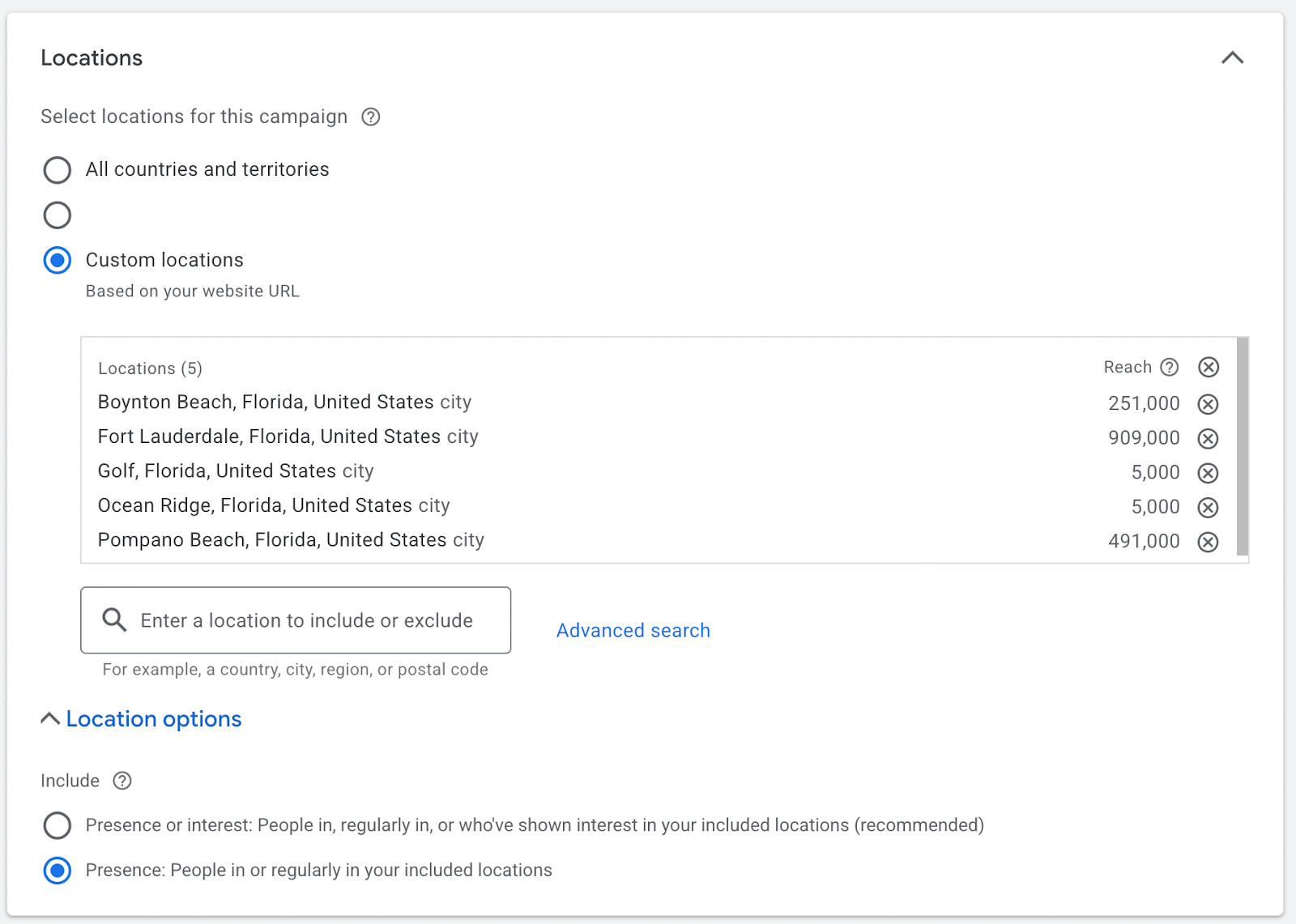
6) Location targeting can quietly waste your budget if you don’t fix it.
For roofing services, you typically want your ads to show only to people physically in your service area. However, Google doesn’t always do this by default.
Google gives you two options:
- Show ads to people in your location
- Or show ads to people in or interested in your location
For most roofing companies, the second option isn’t helpful. It can show your ads to people outside your service area who have previously searched for that location.
To keep your budget focused, make sure your ads are set to show only to people in your service area. This helps you spend money on real local homeowners, not clicks you can’t turn into jobs.
7) The budget should be set around “clicks per day,” not Google’s suggestions.
Based on my experience, a practical goal is 10 clicks/day; ideally, 20-30 clicks/day if you can afford it. This provides enough data to identify what’s working.
How to Set Up a Roofing Google Ads Campaign
Before you open Google Ads, get the basics straight. It keeps your campaign clean and prevents “random clicks, no calls.”
1) Decide what a lead means for your roofing business
Most roofing companies track at least one of these:
- Phone calls (from the ad and from your website)
- Form submissions (quote request/inspection booking)
2) Choose the right page to send people to
Pick the page that matches the service you want to sell. Ideally, you have separate pages like:
- Roof repair
- Roof replacement
- Roof inspection
- Emergency roofing
- Storm damage roofing
- Commercial roofing (if you offer it)
If commercial is a focus, see our guide to generating commercial roofing leads. If you only have one roofing services page, that’s fine. I mentioned this earlier, but you should avoid sending every click to the homepage unless it’s clearly designed to convert leads quickly.
You can also check out our collection of the best roofing website examples to optimize your own.
3) Define your service area
Write it down clearly: city, county, zip codes, or a radius. Roofing is local; your ads should be too.
Step 1: Create Your Google Ads Account (skip the “easy mode”)
Go to ads.google.com and create your account.
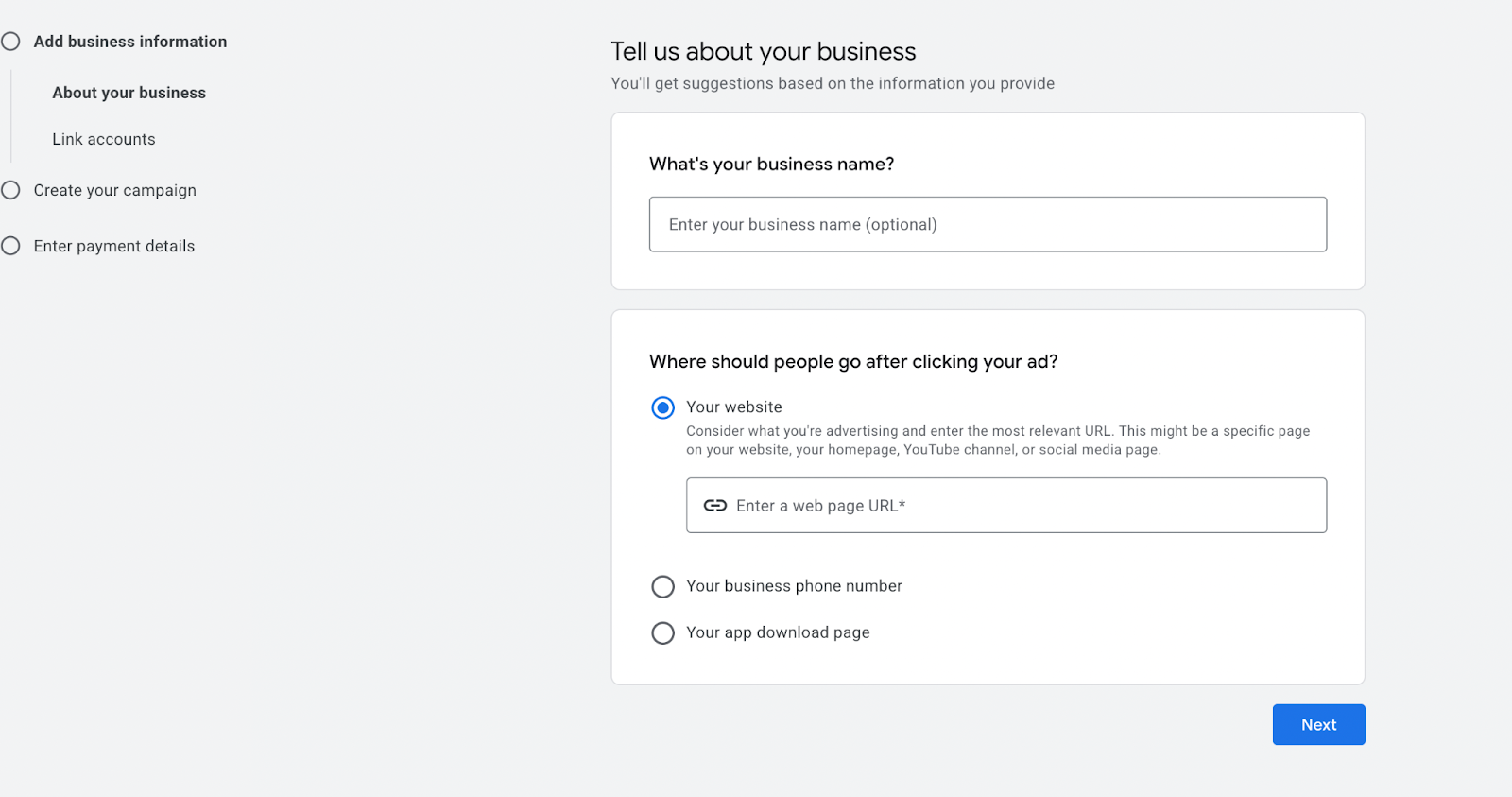
Google may try to push you into a simplified “Smart” campaign setup. Skip that (the “Choose your goal for this campaign” section). You want the whole setup so you can control the settings that protect your budget.
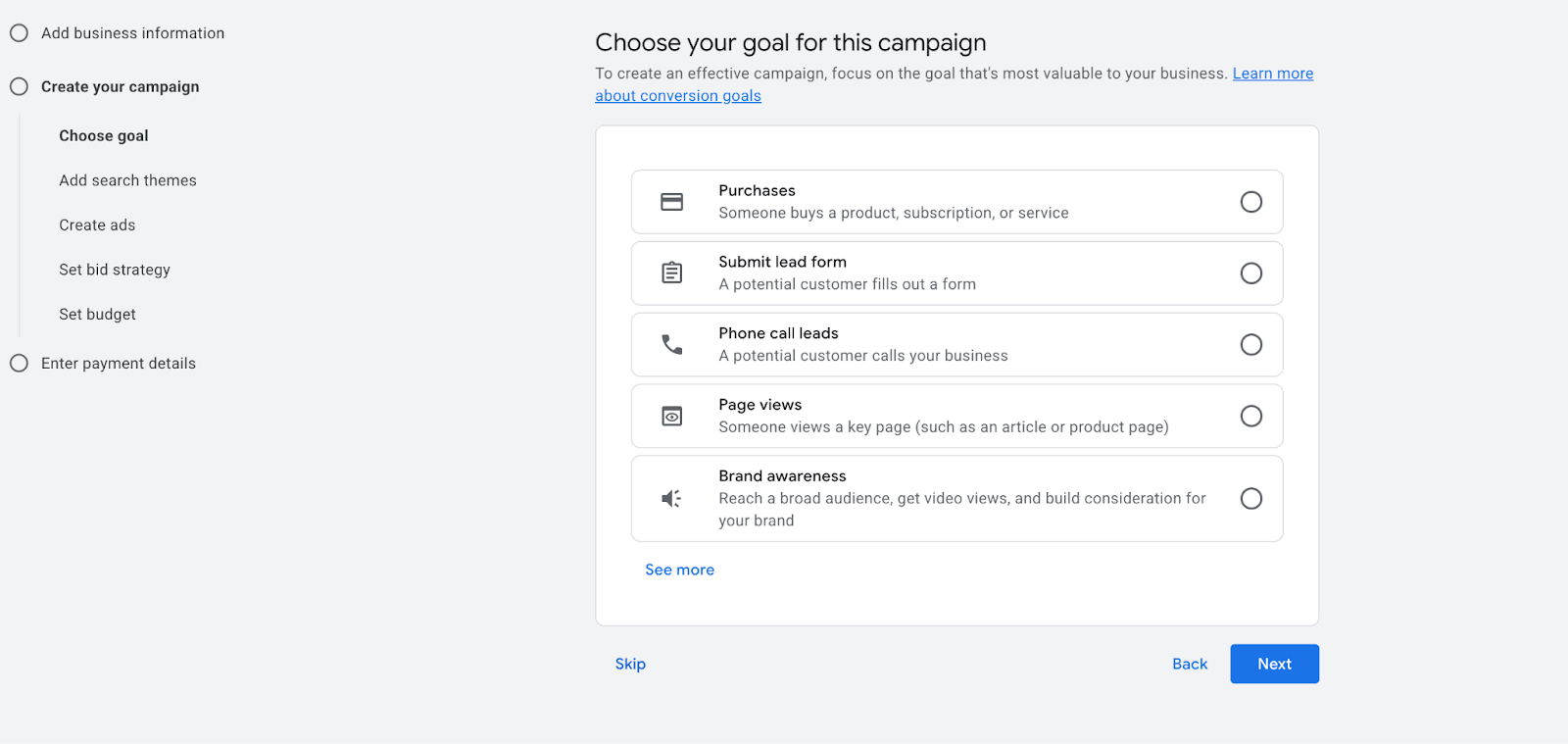
Step 2: Start a New Campaign (Use Search)
Choose campaign type: Search
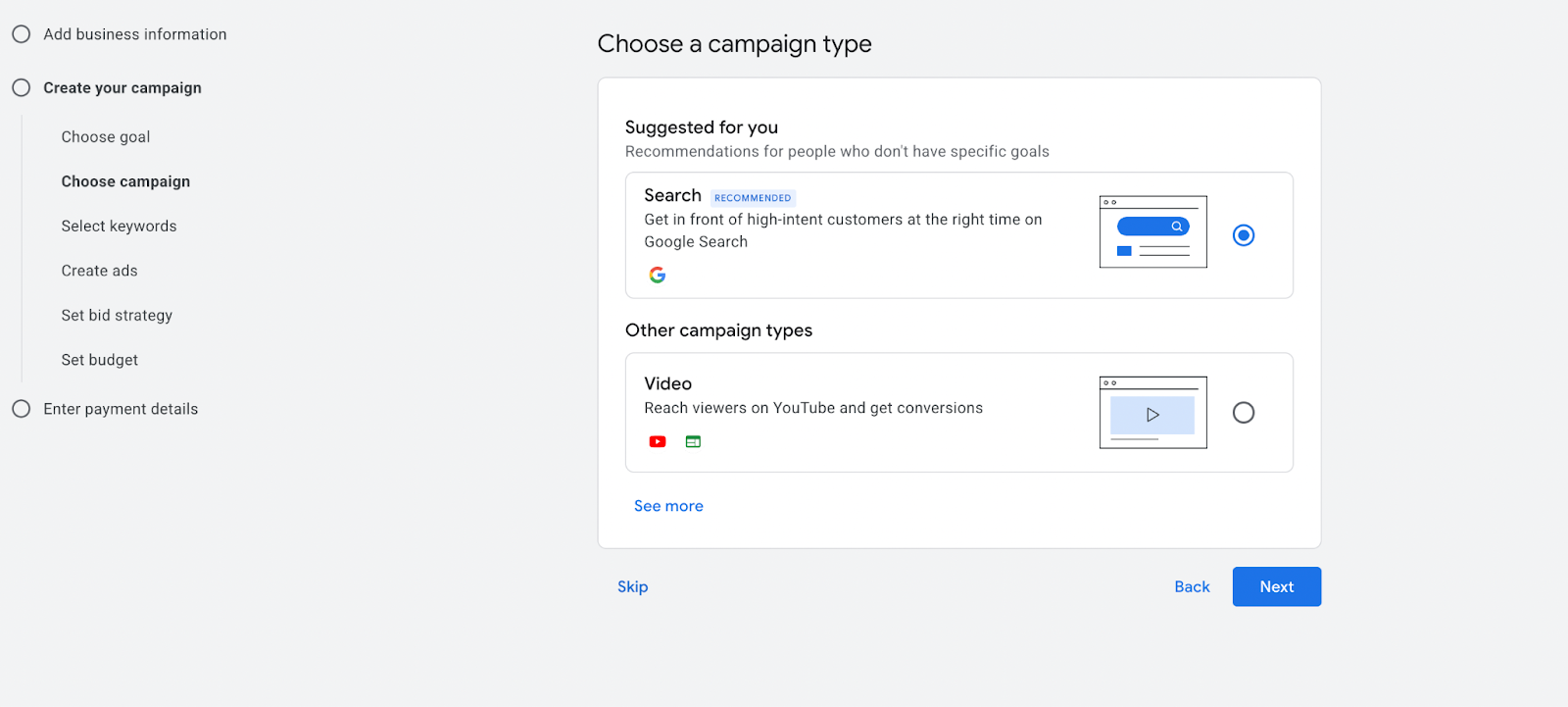
Here you’ll also be able to choose leads as the goal and name the campaign clearly so you can recognize it later:
- Search – Roofing Services – [City]
- Search – Roof Repair – [City/County]
- Search – Roof Replacement – [City]
Step 3: Do Keyword Research and Add The Keywords (Start Small and Controlled)
Once you click “Next,” you’ll see a page with auto-generated keywords that Google found relevant for your site, goal, and campaign.
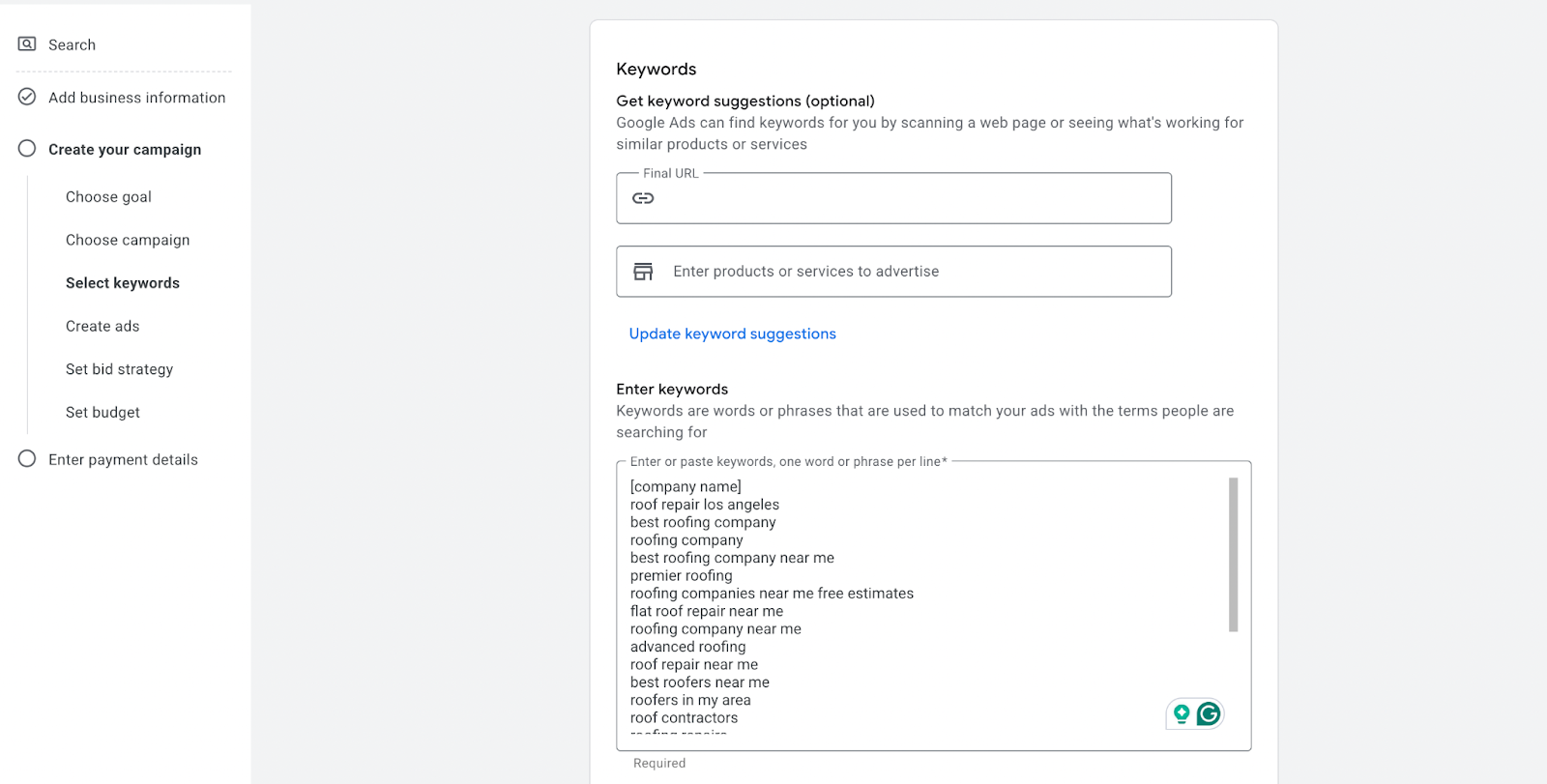
You can conduct additional research using alternative tools, such as Ahrefs, to make the list richer. When reviewing keywords, focus on:
- Relevance (does it match the job you want?)
- Bid range (gives you a rough cost expectation)
- Search volume (helps you prioritize)
I’ve also prepared a list of 100+ high-search-volume roofing keywords you can review. It will also explain the structure of local roofing keywords, helping you identify potential target keywords.
Once you have a good list of keywords, filter them out.
You won’t need a huge list right away. Start with a handful of high-intent keywords per ad group. A simple approach:
- Add 1-2 broad match keywords (for discovery)
- Add exact match keywords for the core terms (for control)
This gives you enough data without letting the campaign drift.
Step 4: Campaign Settings that Matter Most (the Money-Saver Section)
This is where beginners accidentally waste budget, so slow down here. On the same page, you’ll see a few settings you need to explore:
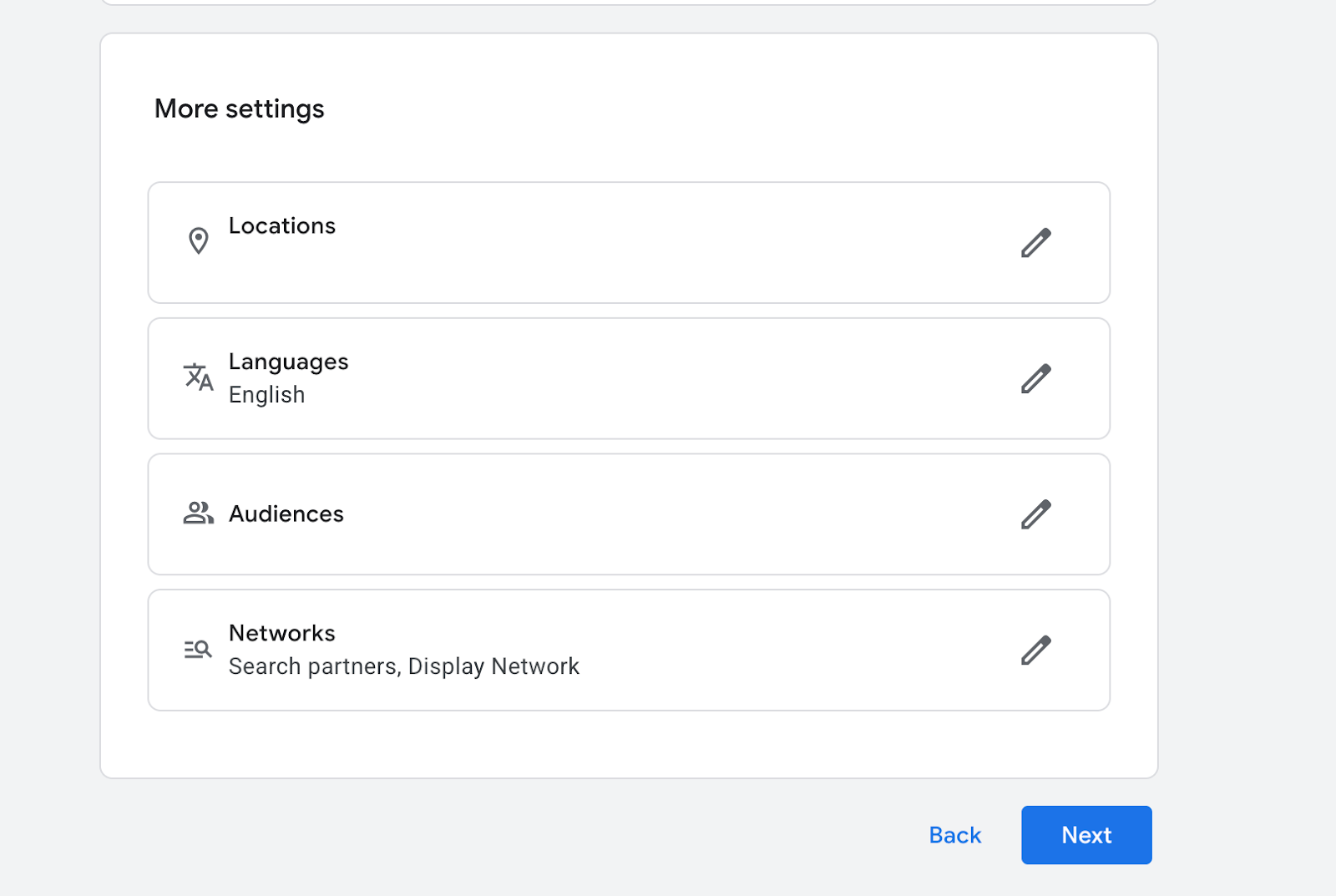
Locations:
- Add your service area (cities/zip codes/counties/radius)
- Set location option to: Presence (people in your location)
Language:
- Keep one language per campaign
Audiences: Add audiences in Observation mode (not targeting). This doesn’t limit reach; it just shows you who’s converting.

Networks:
- Search Partners: often off at first
- Display Network: off
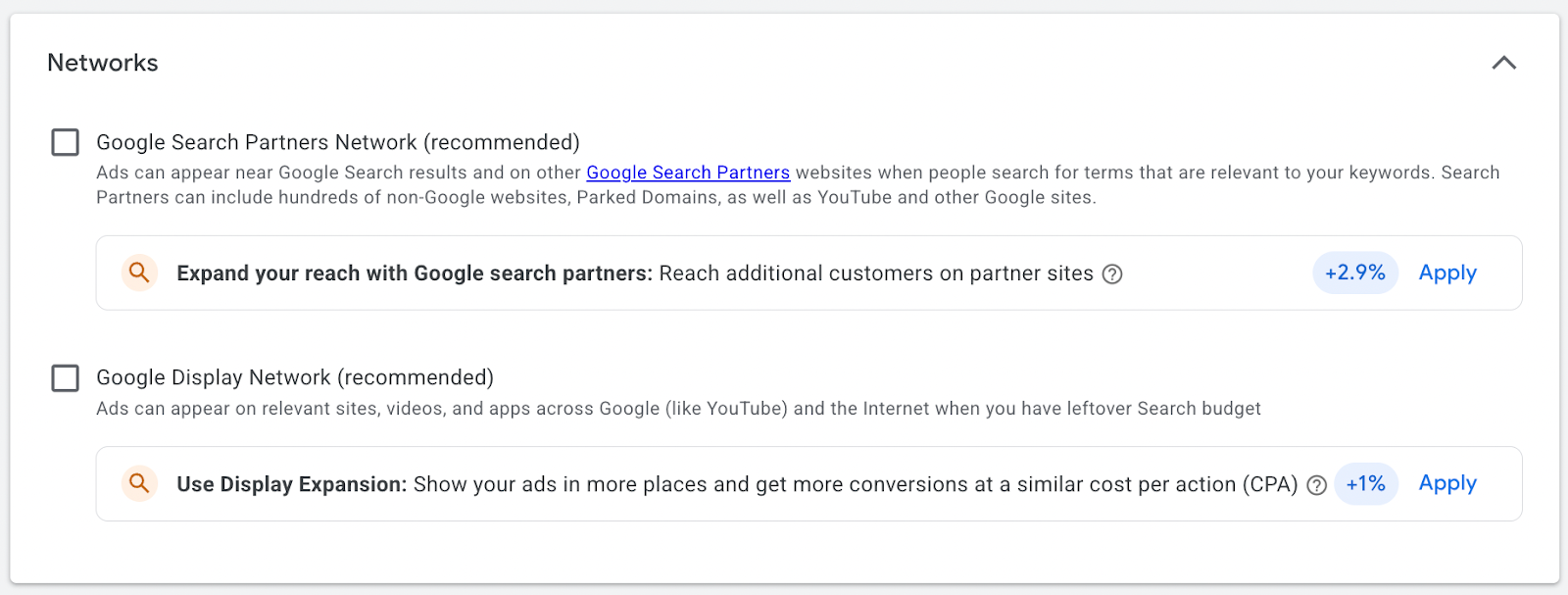
I’ve explained why we do this in our insights section.
Step 5: Write Your Search Ad
Your ad should match what the homeowner is searching for, especially in roofing, where people often want help fast. Include:
- The service (repair, replacement, emergency, etc.)
- The location/service area
- A trust signal (licensed & insured, warranty, reviews, years in business)
- A clear next step (Call now, Get a quote, Book an inspection)
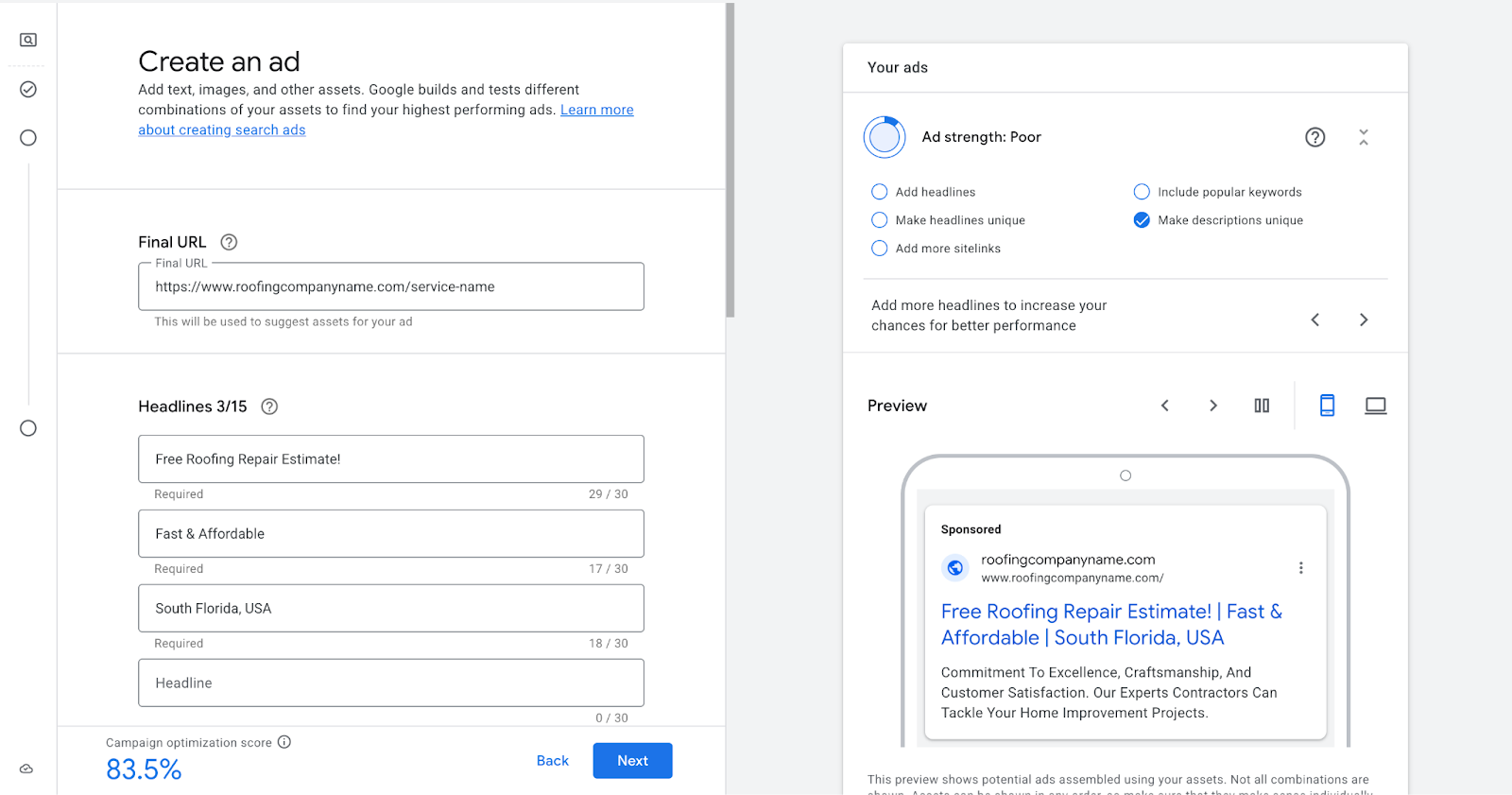
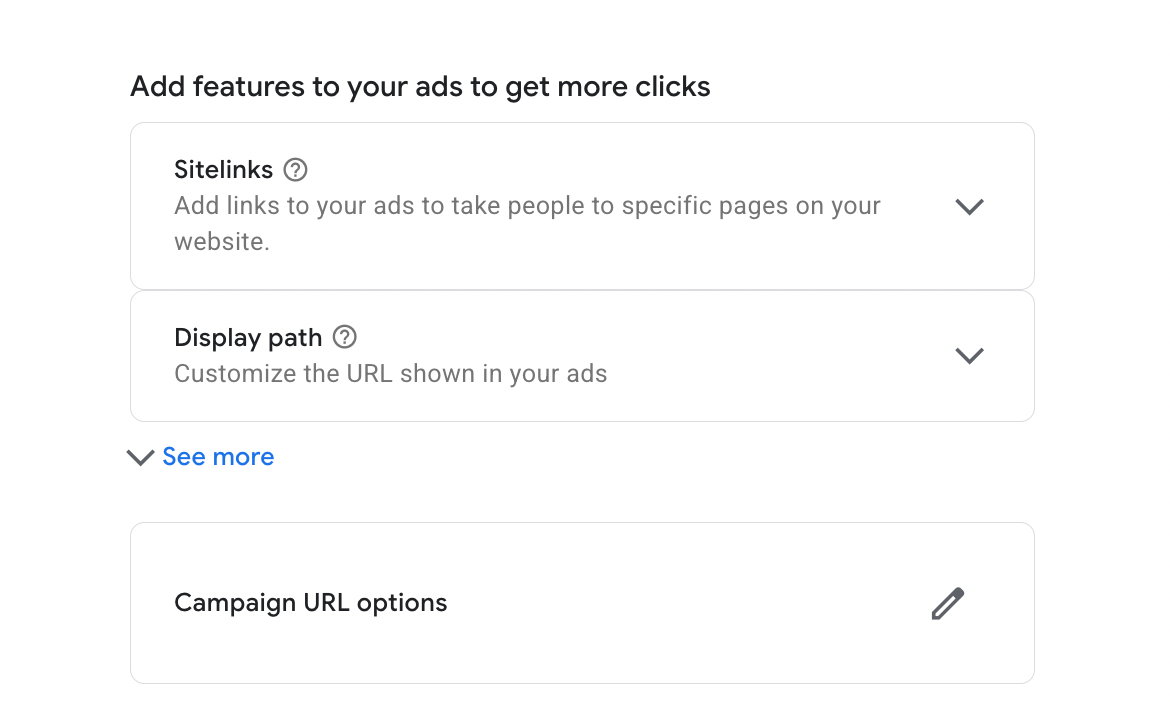
Also, add ad assets (they help your ad take up more space):
- Sitelinks (Services, Service Areas, Reviews, Financing, Emergency Service)
- Call asset (if you take calls)
- Location asset (if you have a Google Business Profile)
Explore our guide on local roofing SEO to see how to set up your local assets correctly!
Step 6: Pick a Beginner-Safe Bidding Option
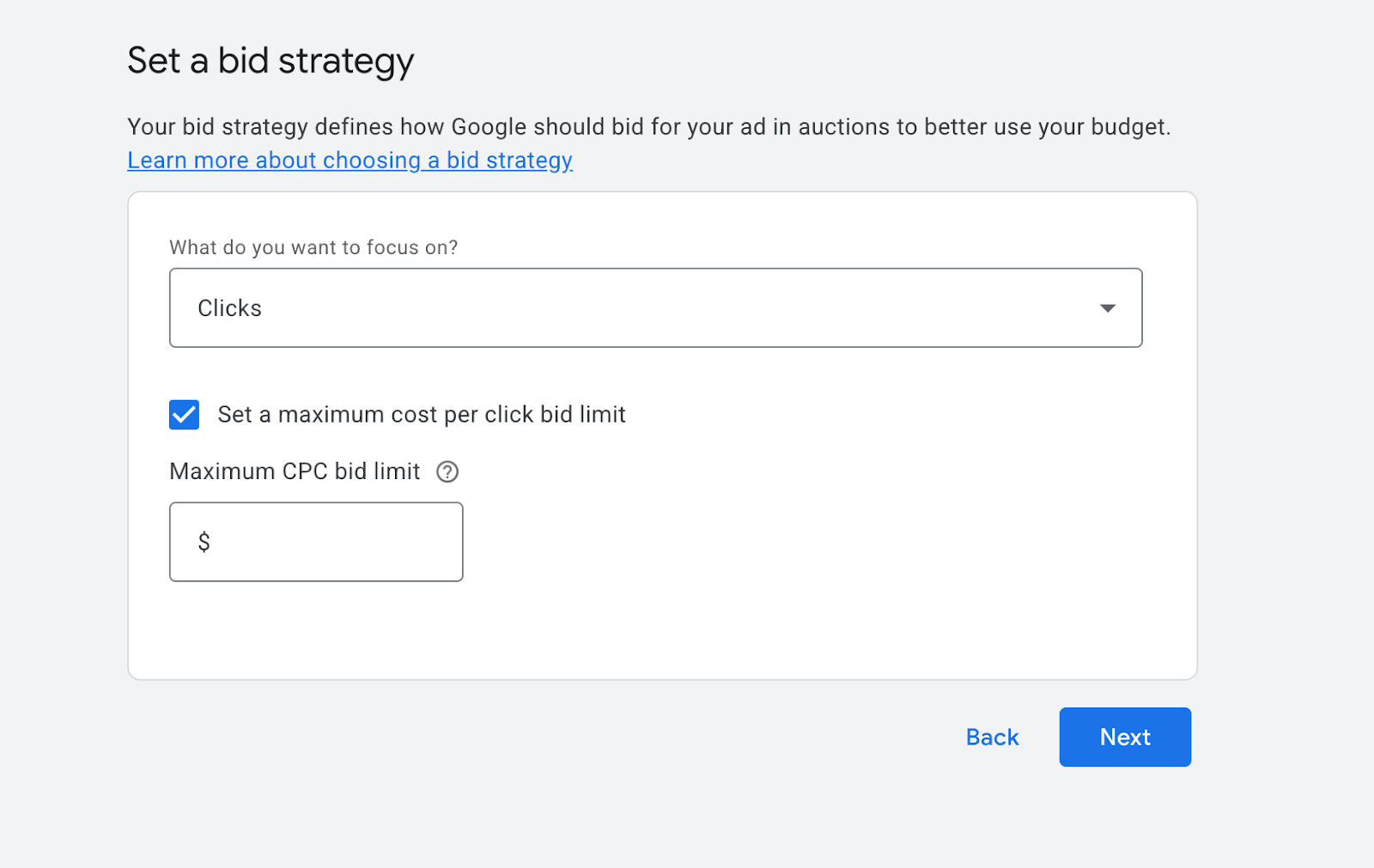
For a brand-new account, a safe starting point is to focus on clicks.
As I mentioned earlier, clicks help you collect data and see which searches are performing. Later, once calls/forms are tracking and you have consistent lead data, you can switch to “Maximize Conversions.”
Because roofing clicks can be expensive, you may choose to set a maximum CPC limit as a temporary safeguard. This is optional and should be adjusted or removed once you see consistent performance.
Step 7: Set Daily Budget Based on the Clicks You Want
Instead of following Google’s suggested budgets, start with a daily click goal that feels sustainable for your roofing business.
Because roofing clicks are competitive, it’s normal to see CPCs between $10 and $30. That doesn’t mean you need a massive daily budget right away.
A more realistic starting range:
- 5-10 clicks per day – a safe starting point for most roofing companies
- 10-15 clicks per day – better data, still manageable
- 20+ clicks per day – faster learning, usually for larger budgets or scaling
Quick math: If your average click is ~$20, 5 clicks/day will be $100/day, and 10 clicks/day will be $200/day.
Start where you’re comfortable. You can always increase the budget once you see call volume and form submissions increase.
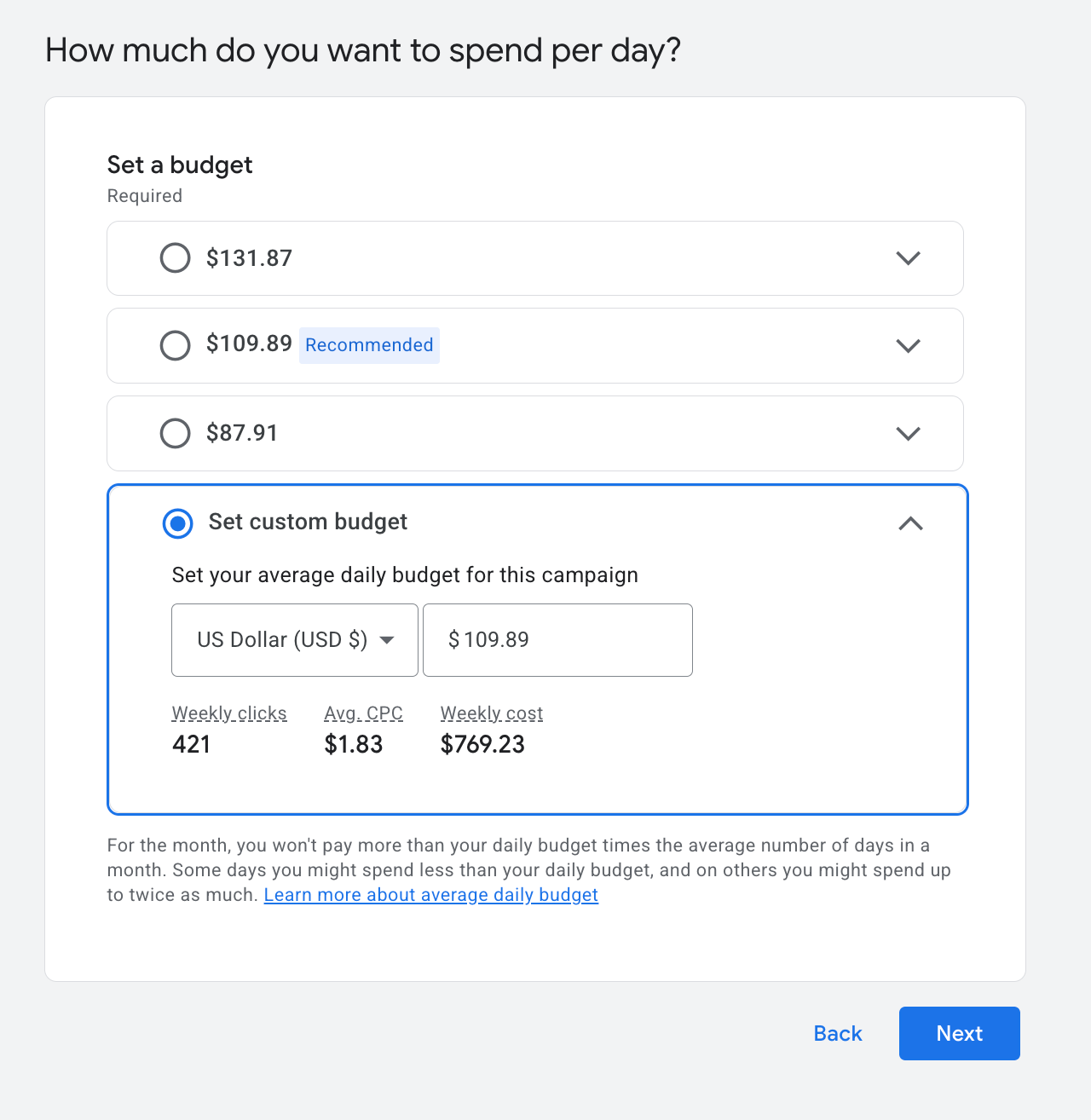
(Use Keyword Planner to estimate CPCs so you’re not guessing.)
Step 8: Publish and Set Up Conversion Tracking ASAP
Here is the final step in Google Ads for roofing: publish the campaign, then ensure conversion tracking is enabled immediately. For roofing services, your first tracking priorities are usually:
- Phone calls
- Form submissions
Once conversions are tracking and you’re getting consistent lead volume, switching from Maximize Clicks → Maximize Conversions usually starts to make sense.
Get More Roofing Jobs with a Google Ads Strategy and Roofing SEO Combined
Google Ads can be a powerful way to generate roofing leads, and now you know how to set it up properly. But as you’ve probably noticed, clicks in this industry aren’t cheap, and paid ads work best when they’re part of a bigger picture.
The roofing companies that see steady, sustainable results don’t rely on ads alone. They combine Google Ads with strong roofing SEO, clear service pages, online roofing brand reputation, and local authority, so whether a homeowner finds them through ads or organic search, the site converts.
If you want help building that kind of foundation, where your website, SEO, and ads work together instead of in isolation, get in touch with us. We’ll make sure your roofing site is optimized to rank, convert, and earn trust in your local market, long before every click costs you money.
FAQs About Google Ads for Roofing Companies
Is a small monthly budget enough to run roofing Google Ads?
A small budget can work in less competitive markets or when targeting a tight radius. Expect limited lead volume with budgets under $1,500 per month. Most roofers find they need to test and scale to discover their profitable threshold in their specific market.
How long does it take to see leads from a new roofing Google Ads campaign?
Leads can come within the first week of launching. But campaigns typically require 2 to 4 weeks of data to be optimized effectively. The first month is often a learning phase where you're gathering information about which keywords convert and which ones waste budget.
Can roofers run Google Ads and invest in SEO simultaneously?
Yes, and most successful roofing companies do both. Ads provide immediate leads while SEO builds long-term organic visibility. Over time, strong SEO rankings reduce dependence on paid traffic and lower overall customer acquisition costs. This combination helps you to scale your roofing business properly.


.webp)