



%20(1).png)
Homeowners will be looking for roofers on their phone most of the time. So, your site needs to be clear, fast, and have the right messaging in the right place on the phone.
The basic four things for your roofing mobile site optimization will be these:
- A responsive and adaptable design to any screen size
- A page that loads in under 2.5 seconds
- A tappable phone number
- A simple enough navigation to help folks in a panic find "Emergency Repair" in two taps
Now, let me show you exactly how to do each piece, with the specific metrics to hit and the tools to check your work.
Why Mobile Optimization Is a Roofing-Specific SEO Problem
There are two reasons I’ve seen:
First, Google indexes your mobile site, not your desktop one.
Since Google moved to mobile-first indexing, the mobile version of your pages is what gets crawled, evaluated, and ranked. If a service page, a piece of content, or your internal links only render properly on desktop, Google is effectively working with a broken or incomplete version of your site. This is one of the first things we check in every SEO audit we run.
Second, roofing searches skew mobile and urgent.
Nobody sits down at a desktop to search "roof leaking during storm." They're on their phone, often outside, often stressed, and they're going to call whoever's site gives them an answer and a phone number fastest. That means mobile speed and usability are the difference between a lead and a bounce. A site that ranks well but loads slowly on mobile is still losing the call to a competitor two spots down.
That combination - Google grading your mobile experience, and your customers being mobile-first by necessity - is why this deserves its own deep dive instead of a bullet point buried in a general SEO checklist.
How Google Measures Your Mobile Experience
Google uses three metrics called Core Web Vitals to judge whether a page delivers a good mobile experience. You can pull your exact numbers in under a minute.
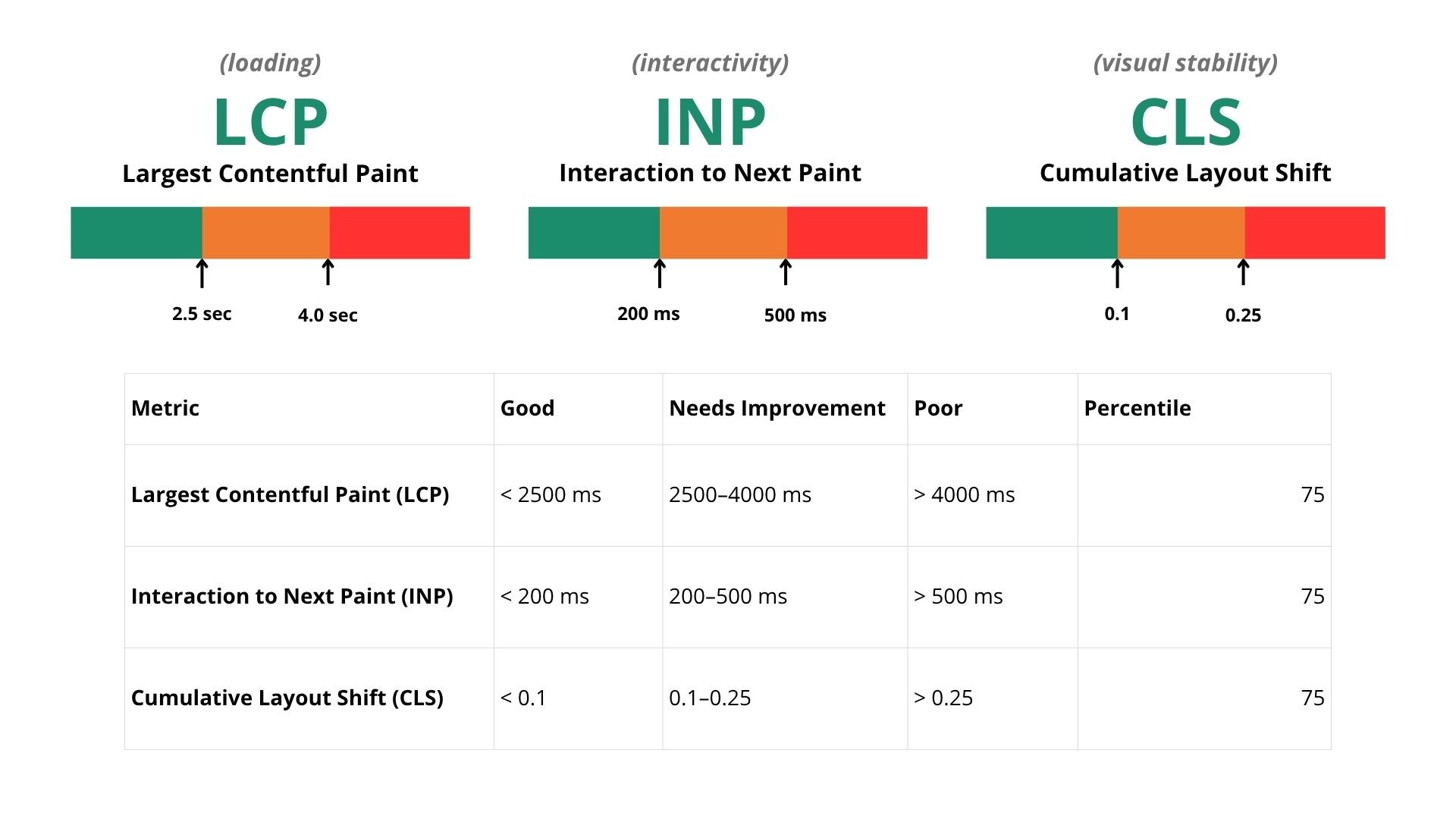
Largest Contentful Paint (LCP) measures how long it takes the biggest visible element on the page to load - on most roofing sites, that's a hero image or a photo slider.
Target: under 2.5 seconds.
Interaction to Next Paint (INP) measures how responsive your site feels when someone actually taps something - a menu, a button, a form field.
Target: under 200 milliseconds.
Cumulative Layout Shift (CLS) measures whether things jump around while the page loads - a common problem when a review widget or a lazy-loaded image pushes content down right as someone's about to tap a button.
Target: under 0.1.
Here's how to check yours:
- Go to Google PageSpeed Insights and run your homepage and your top service pages, one at a time.
- Look at the mobile tab specifically - the desktop score doesn't matter nearly as much for ranking purposes.
- Note which of the three metrics is red or yellow. That tells you exactly where to focus first.
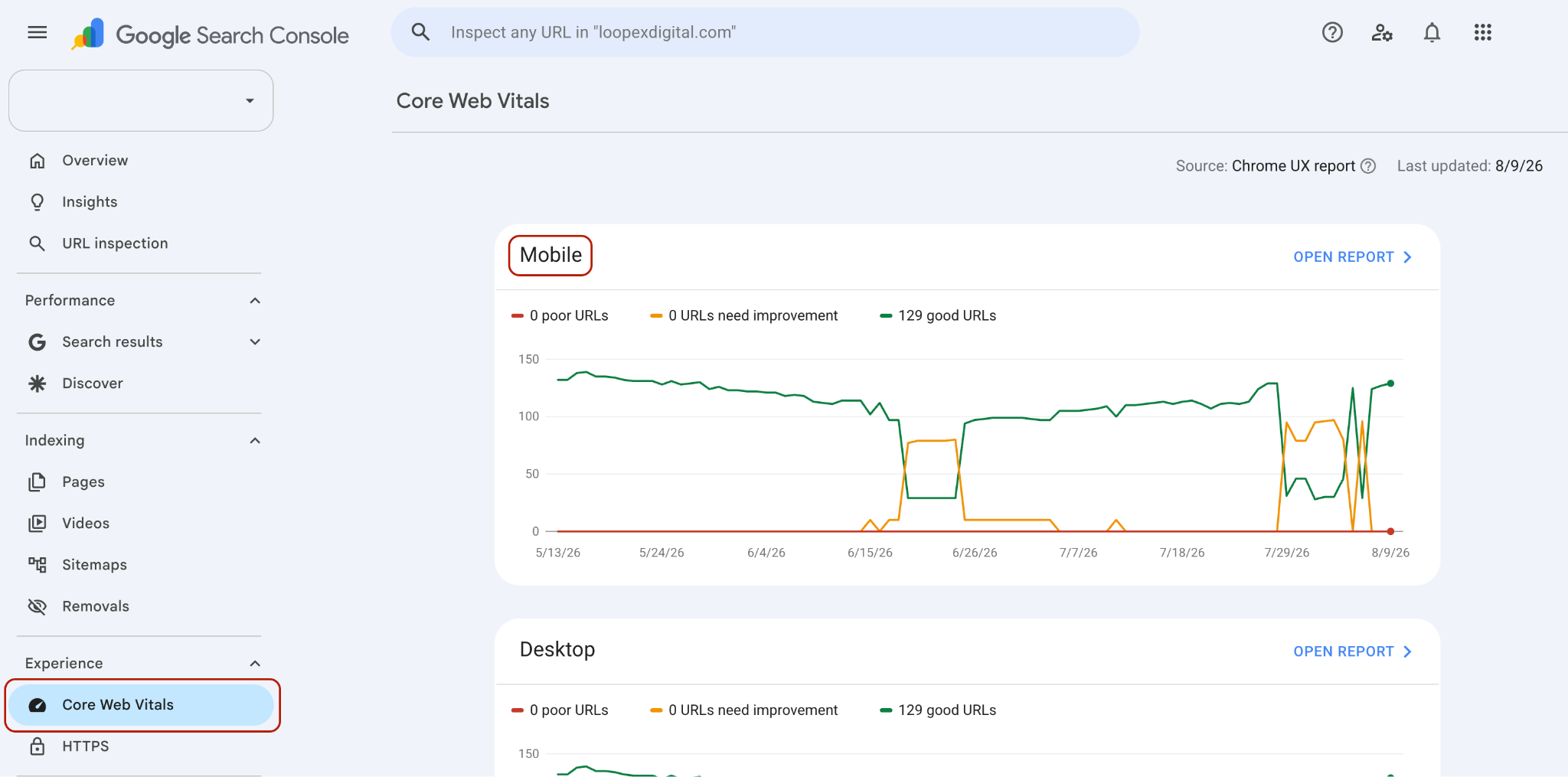
- Cross-check with Google Search Console's Core Web Vitals report, which shows trends over time across your whole site rather than a single page snapshot.
If you want a rough benchmark: a mobile PageSpeed score under 50 usually means images and unoptimized code are actively costing you rankings and leads. Above 90 is where you want to land.
This is a simple check that is under technical SEO for every roofing client - the audit always starts here, because nothing else on the page matters if it doesn't load.
Step-by-Step Mobile Optimization Framework for Roofers
1. Audit Your Responsive Design
A site can technically be "responsive" and still break on mobile in ways that hurt both users and rankings. Test yours with Chrome DevTools' device toolbar (right-click → Inspect → toggle device toolbar) at two specific widths: 375px and 390px, which cover the most common phone screens in use today.
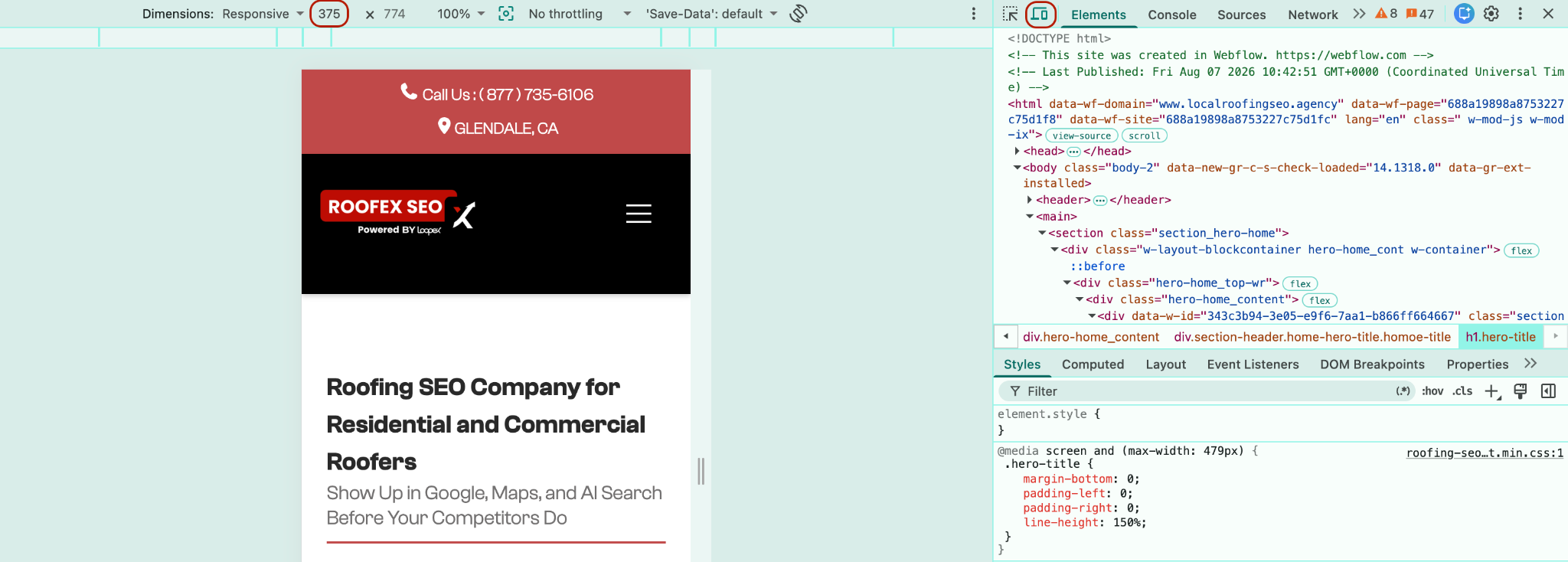
What tends to break on roofing sites specifically:
- Before-and-after photo sliders overflowing the screen width
- Multi-column service grids collapsing into a messy single column
- Embedded quote forms cutting off fields on the right edge
- Sticky headers that eat up half the visible screen on smaller phones
But all these are quick to fix:
- Use fluid grid units instead of fixed pixel widths,
- Set max-width: 100% on all images so they scale instead of overflow,
- Physically test every major page template at those two widths before calling it done.
If your site was built years ago or has had a lot of plugins bolted onto it, this is often where a rebuild makes more sense than another patch - something our web design team runs into constantly with older roofing sites.
2. Fix Your Page Speed, Starting with Images
Roofing sites are photo-heavy by nature. Project galleries, before-and-afters, drone shots of a new roof, and that's almost always the single biggest speed killer we find on mobile.
Let’s fix it together, in order:
- Compress every image before uploading, using a tool like TinyPNG or Squoosh.
- Convert to WebP format, which is roughly 25-35% smaller than JPEG at the same visual quality.
- Lazy-load anything below the fold so the browser isn't loading twenty gallery photos before someone even scrolls.
- Set explicit width and height attributes on every image tag, so the browser reserves the space in advance. This alone prevents most CLS issues.
Let’s say you’re cutting a 2MB gallery image down to a 200KB WebP file. It can take a page's load time from around 5 seconds to under 2. It might seem small, sure, but it’s the difference between someone waiting and someone bouncing back to the search results.
3. Make Click-to-Call Effective
This sounds basic, but it's one of the most common things we find broken in an initial audit: a phone number that's just plain text, not a clickable link. On mobile, that means someone has to manually copy and dial the number instead of tapping once.
The fix is one line of code:
<a href="tel:+15551234567">(555) 123-4567</a>
Beyond the technical fix, placement matters. Your number should live in a sticky header or footer bar that stays visible as someone scrolls, and it should appear above the fold on every service and location page.
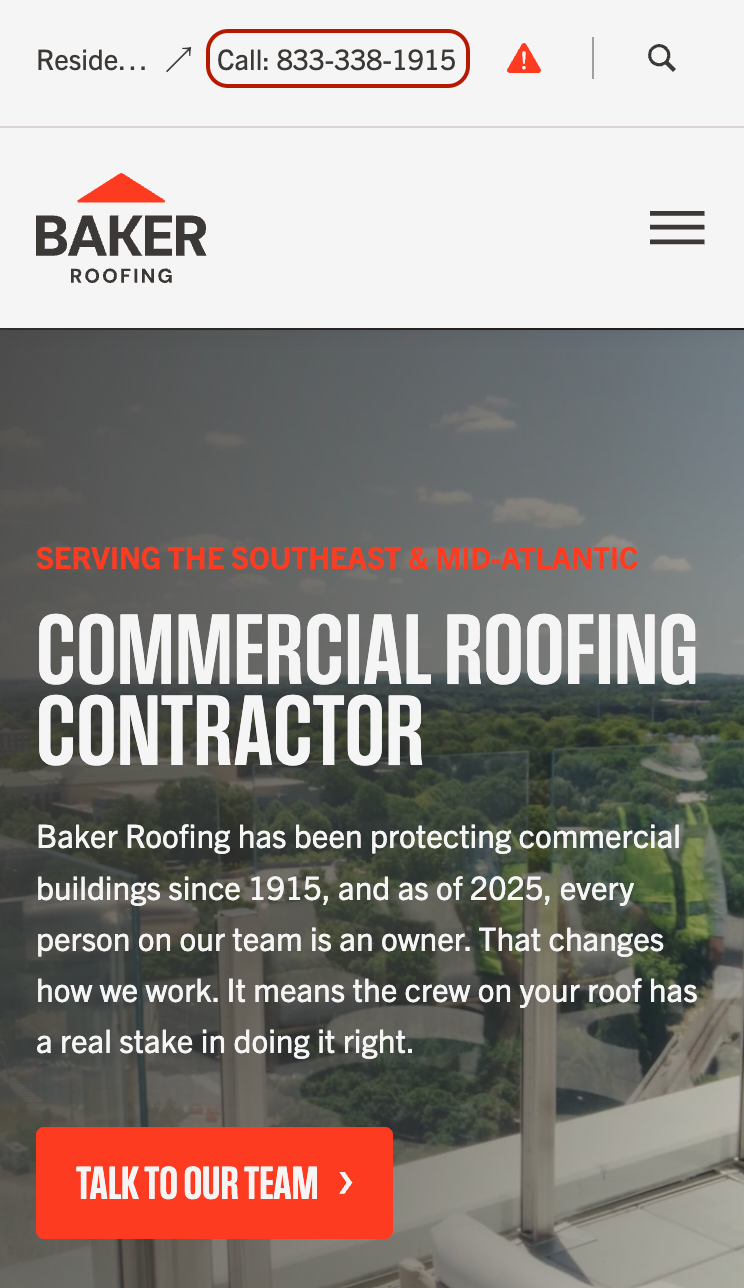
This is a rare case where a small SEO/UX fix has a direct, immediate line to lead volume, which is why it's a standard part of the CRO work we do alongside technical fixes.
4. Design Navigation for the Thumb
On mobile, people navigate with one thumb, usually while holding the phone in one hand. The "thumb zone" (the area easiest to reach without shifting your grip) is roughly the bottom half of the screen. Menus and CTAs that require reaching to the top corner add friction you don't need.
For a roofing site, the mobile menu should collapse down to the essentials:
- Services,
- Service Areas,
- Emergency Repair,
- Free Estimate,
- Reviews.
Cut anything that dilutes the primary path - blog category pages, staff bios, and glossary pages don't belong in a mobile nav menu; they can be elsewhere.
One of our roofing SEO agency's experts recommended this pretty easy tactic you can try: make sure your CTA button never blends into a heading of a similar color. It should visually stand alone - a different color, enough contrast, and no competing element nearby. It's a small detail, but it directly affects whether someone taps it.
5. Simplify Forms for Mobile Typing
Typing on a phone is slow and error-prone, so every extra field on a quote form is a small tax on your conversion rate. Strip it down to what you really-really need to follow up: name, phone number, and the service they're looking for. Everything else can be gathered on the call.
A few technical details that matter more than they seem:
- Use type="tel" on phone fields so mobile keyboards default to the numeric pad
- Make tap targets at least 44x44 pixels - Google and Apple's own accessibility guidelines, and a good baseline for "easy to hit with a thumb"
- Confirm the form redirects to a thank-you page after submission - we still regularly find quote forms on roofing sites that submit into nothing, silently losing leads with no error and no confirmation
6. Connect Mobile Experience to Local Search
Your mobile site and your Google Business Profile are systems that feed into each other. Someone finds you in the local map pack, taps through, and lands on your mobile site within seconds. If that experience is slow or confusing, it's a weak engagement signal that can work against your local rankings over time. Plus, you lose your lead, of course.
A few things worth checking here:
- Click-to-call links from your Google Business Profile should dial the same number listed on your site (NAP consistency matters for local ranking)
- Your service area pages should be built and optimized specifically for mobile, since that's how most of that map-pack traffic arrives
- If you haven't already, it's worth reviewing your Google Maps optimization setup alongside your mobile audit
7. Use Schema Markup
Mobile screens are small, which means winning a rich snippet (star ratings, an expandable FAQ, business hours right in the search result) matters more on mobile than desktop, simply because it takes up a bigger share of what's visible.
At minimum, implement:
- LocalBusiness schema with your name, address, phone, and hours
- Service schema on your core service pages
- FAQ schema on pages where you're answering common questions directly
This is also increasingly relevant for how AI search results pull and cite information - a well-structured, fast-loading mobile page with clear schema is exactly what tools like Google's AI Overviews and other AI search features tend to pull from. If you want to go deeper on that side of things, we've covered it in more detail in our guide to AI search optimization for roofing companies.
How to Test and Monitor Mobile Performance Going Forward
Mobile optimization will need your on-going attention. When you have a new gallery upload or plugin update, it can easily undo weeks of work. So, you need to do monitoring with at least some minimal but clear routine:
- Run PageSpeed Insights on your top 5-10 pages monthly, mobile tab only
- Watch the Core Web Vitals report in Search Console for trend lines. A slow decline is easier to catch and fix early than a site that's quietly gotten worse over six months
A "passing" report means all three Core Web Vitals sit in the green zone across most of your pages. It's common for a homepage to look great while service and location pages (the ones converting local search traffic) lag behind.
Common Mobile Optimization Mistakes We See on Roofing Websites
I mentioned nearly all of these, but let me give you a quick reminder. Here’s the list of the issues that show up most often in our audits, each tied back to what fixes them:
- Phone numbers in the footer that aren't clickable - wrap every instance in a tel: link, not just the one in the header
- Quote forms that submit into nothing - always confirm there's a working thank-you page or confirmation message
- Heavy image sliders tanking LCP - compress, convert to WebP, and lazy-load below the fold
- Cluttered above-the-fold navigation - social media icons and secondary links pushed above the phone number and primary CTA
- CTA buttons blending into the background - contrast and spacing fixes that take minutes but change conversion rates
Next Step
Run your homepage through PageSpeed Insights right now and see what's red. If it's images, start compressing. If it's a layout shift, check your ad or widget placements. And if the audit turns up more than a few issues at once, that's usually a sign it's worth having a full roofing SEO audit done rather than patching one metric at a time.
We do this for you completely for free, so just contact us, and we’ll get back to you with a clear roadmap to mobile optimization success.
Frequently Asked Questions
Does Google rank the mobile or desktop version of my roofing site?
The mobile version. Since Google's shift to mobile-first indexing, its crawlers primarily use the mobile version of your pages to index and rank content, even for searches performed on desktop.
What's a good page load time for a roofing website on mobile?
Aim for a Largest Contentful Paint under 2.5 seconds. Anything much slower than that, especially on service or location pages, tends to correlate with both lower rankings and higher bounce rates.
Do I need a separate mobile site, or does responsive design cover it?
Responsive design is the right approach for almost every roofing site today. A separate mobile URL (like an m.yoursite.com setup) adds maintenance overhead and technical SEO complexity without a meaningful benefit over a well-built responsive site.
How does mobile speed affect my Google Business Profile ranking?
Indirectly but meaningfully - a slow or broken mobile experience after someone taps through from your Business Profile hurts engagement signals like bounce rate and time on site, which factor into local ranking over time.


.webp)